
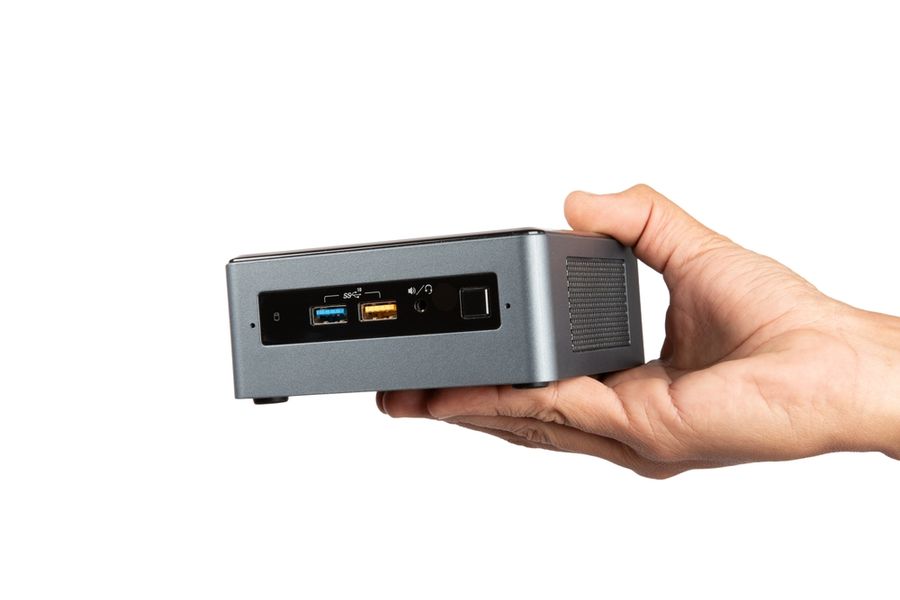
Mini PCs have become an increasingly attractive option for people who want desktop computing capabilities without the bulk of a conventional tower. Many compact devices can handle everyday tasks, support multiple monitors, and, depending on their specifications, run demanding productivity and creative applications. However, their smaller size introduces trade-offs involving cooling, upgrade options, and graphics performance. Understanding where mini PCs excel and where traditional desktops remain superior can help buyers choose the right computer for their needs.
What Makes Mini PCs Different From Traditional Desktops?
Mini PCs contain many of the same essential components as traditional desktops, including processors, memory, storage, and connectivity hardware. Their main distinction is physical size. Instead of occupying substantial space beneath a desk, many mini PCs can fit comfortably beside a monitor or even mount behind one.
Compact designs are possible because manufacturers use smaller circuit boards, integrated components, and efficient cooling systems. The Lenovo ThinkCentre neo 50q Gen 5 illustrates this approach with a chassis measuring approximately 7.05 inches wide, 7.2 inches deep, and 1.44 inches high, depending on configuration.
Traditional desktop towers generally require more room but offer greater flexibility for installing additional components. Mini PCs prioritize compactness, making them especially attractive for small offices, apartments, and workspaces where keeping equipment out of sight matters.
Everyday Performance: Can Mini PCs Handle Common Tasks?
For everyday computing, a properly equipped mini PC can perform much like a conventional desktop. Browsing websites, managing email, creating documents, attending video meetings, and streaming entertainment generally don't require the large chassis or dedicated graphics card found in many tower computers.
Modern mini PCs are available with capable processors and substantial memory. For example, the ASUS NUC 15 Pro supports Intel Core and Core Ultra processor configurations, along with DDR5 memory and solid-state storage. These specifications make appropriately configured models suitable for office applications, multitasking, and many everyday business activities.
However, performance depends on the actual hardware rather than the computer's size. An inexpensive mini PC with limited memory may struggle with demanding applications, while a more powerful model can handle several programs simultaneously. Buyers should compare processor capabilities, installed RAM, and storage specifications instead of assuming all mini PCs deliver similar results.
Gaming and Creative Work: Where Traditional Desktops Excel
Gaming and content creation reveal some of the most important differences between compact and conventional computers. Although modern integrated graphics processors can handle casual games, streaming, and certain creative applications, demanding games and professional workloads often benefit from dedicated graphics hardware.
A traditional desktop tower generally offers more options for installing powerful graphics cards, additional cooling equipment, and high-capacity storage. These advantages are particularly valuable for enthusiasts who play graphically demanding games, render three-dimensional models, or edit complex video projects.
Mini PCs aren't necessarily unsuitable for creative work. Apple's Mac mini, for example, offers hardware acceleration for several professional video formats, making suitable configurations useful for video editing and media production. Nevertheless, buyers should examine application requirements and performance benchmarks before selecting a compact system.
Those who prioritize high-resolution gaming, extensive hardware customization, or intensive graphics processing may find a conventional tower more practical over the long term.
Upgrade Options and Long-Term Flexibility
One of the strongest advantages of traditional desktop computers is their potential for future upgrades. Many towers allow users to replace processors, install additional memory, upgrade graphics cards, and add storage drives without replacing the entire computer.
Mini PCs vary considerably in this respect. Some models provide accessible memory slots and replaceable solid-state drives, while others have components permanently integrated into the system. For instance, the ASUS NUC 15 Pro includes two memory slots and support for multiple M.2 storage devices, although available configurations and installation requirements differ.
Buyers should investigate upgrade limitations before purchasing, especially if they expect their computing needs to increase. A mini PC with adequate specifications today may remain useful for years, but limited expansion options could require replacing the system sooner than an easily upgraded desktop.
Energy Consumption, Heat, and Noise
Mini PCs often use energy-efficient processors and compact power supplies, making them appealing to people who want to reduce electricity consumption. Their smaller components can also generate less heat than high-performance desktop hardware, although actual efficiency depends on the specific model and workload.
Cooling is another consideration. Because mini PCs have limited internal space, their fans may need to work harder during demanding activities. Some models remain relatively quiet during everyday tasks but become noticeably louder under sustained processing loads. Fanless designs eliminate mechanical fan noise, although they may offer less processing power or rely on reduced performance to manage heat.
Traditional desktops generally accommodate larger fans and cooling systems, which can help maintain performance during prolonged demanding workloads. However, a powerful tower can consume considerably more electricity, particularly when equipped with a dedicated graphics card.
Comparing Costs and Additional Equipment
Mini PCs can offer attractive value, but their purchase prices shouldn't be evaluated in isolation. Some models arrive fully configured with an operating system, memory, and storage, while barebones versions require buyers to purchase and install certain components separately.
Many mini PCs also require an external monitor, keyboard, mouse, and speakers or headphones. Traditional towers have similar requirements, although buyers replacing an existing desktop may already own suitable accessories.
Before purchasing, compare the complete cost of equivalent configurations. A mini PC may be economical for everyday productivity, but models equipped for demanding tasks can approach the cost of larger desktop systems. Warranty coverage, repairability, and potential future upgrades also influence overall value.
Choosing Between a Mini PC and a Traditional Desktop
Mini PCs are practical alternatives to traditional desktops for many households and workplaces. Their compact dimensions make them particularly suitable for everyday computing, home offices, entertainment setups, and users who want a less cluttered workspace.
However, traditional desktops remain appealing for demanding gaming, extensive hardware upgrades, and specialized professional workloads. The best choice depends on the applications you use, available space, performance expectations, and plans for future expansion. By comparing complete hardware configurations rather than physical size alone, buyers can select a computer that meets their needs without paying for unnecessary capabilities.